

Viewer minutes and Live Credits
MaxxShow bills on how long viewers watch, not on how many broadcasts you run.
Two numbers
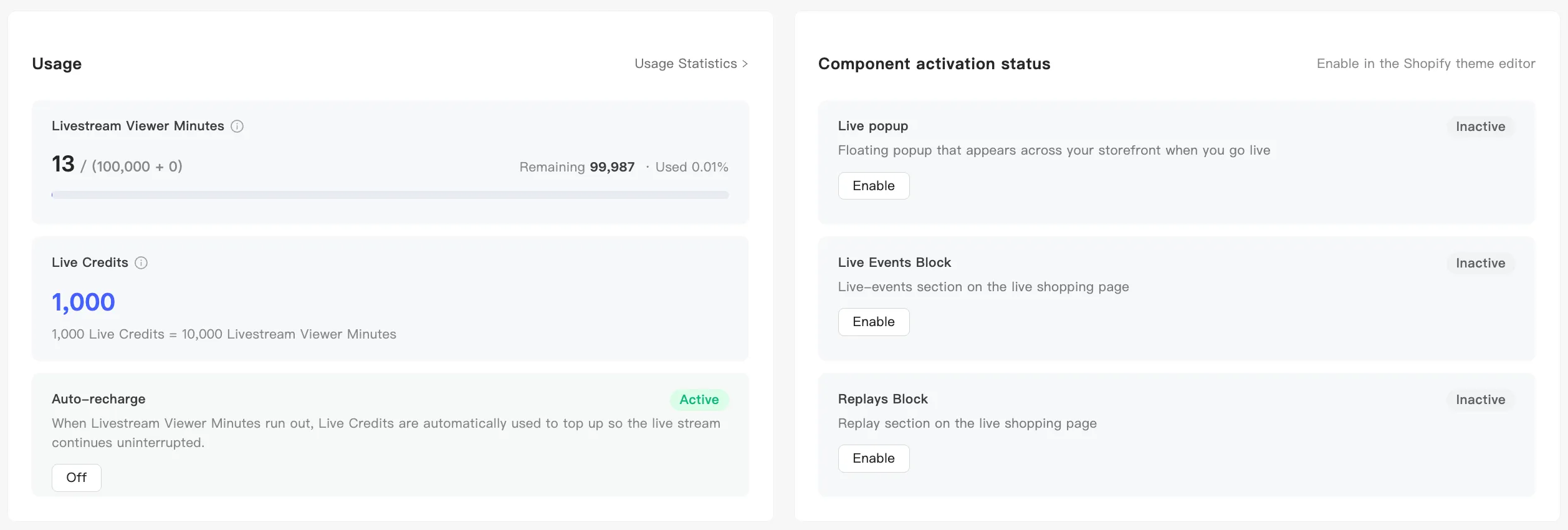
Section titled “Two numbers”The interface puts two balances side by side. Keep them apart:
| What it is | How it moves | |
|---|---|---|
| Livestream Viewer Minutes | Viewer watch minutes, the balance that actually drains | Falls whenever someone watches |
| Live Credits | The balance you top up | Converts into new minutes when minutes run out |
The rate is fixed:
1,000 Live Credits = 10,000 Livestream Viewer Minutes
So one Live Credit buys ten minutes.
Minutes read as used / (plan allowance + add-on allowance). The two parts together are your total. Without an add-on you see a single number.
The Usage Statistics page also heads with your subscription: plan name, an Active marker, the current billing period, and Expiration Date.
What consumes minutes
Section titled “What consumes minutes”Live and replay viewing both count. What drains is the sum of viewer watch time, not your broadcast length. One viewer watching 10 minutes costs 10 minutes. Two viewers watching 10 minutes each costs 20.
So what a broadcast costs depends on how many people come and how long they stay, and you cannot work it out beforehand. For what a session cost, see Consumption and top-up records.
What happens when minutes run out
Section titled “What happens when minutes run out”With Auto-recharge on, hitting zero converts Live Credits into fresh minutes and the broadcast continues. Buy Live Credits under top-up. See Auto-recharge.
Without it, banners warn you in the live console at 80% and 95% of your allowance. Running out force-stops a test. A live broadcast does not cut immediately. A banner starts a countdown, giving you 10 minutes by default to wrap up, then ends the broadcast and generates the replay.